Admissions
Capture enquiries, applications and enrolment in one tracked flow — nothing falls into a spreadsheet between stages.
- Enquiry pipeline
- Application review
- Fee collection
- Enrolment
GurasEMS brings admissions, academics, attendance, exams, fees and communication into a single workspace — so every team works from the same data, and nothing falls between spreadsheets.
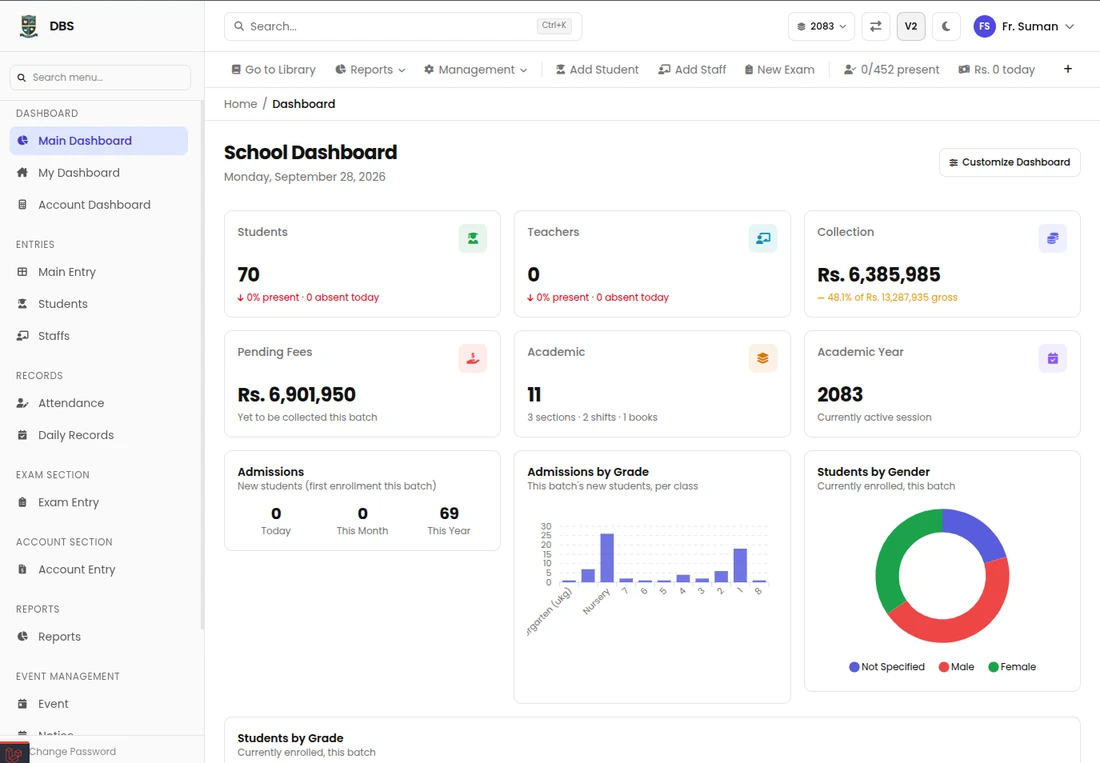
Live dashboard
Updates as data lands
Configure once — every module reads from the same source of truth.
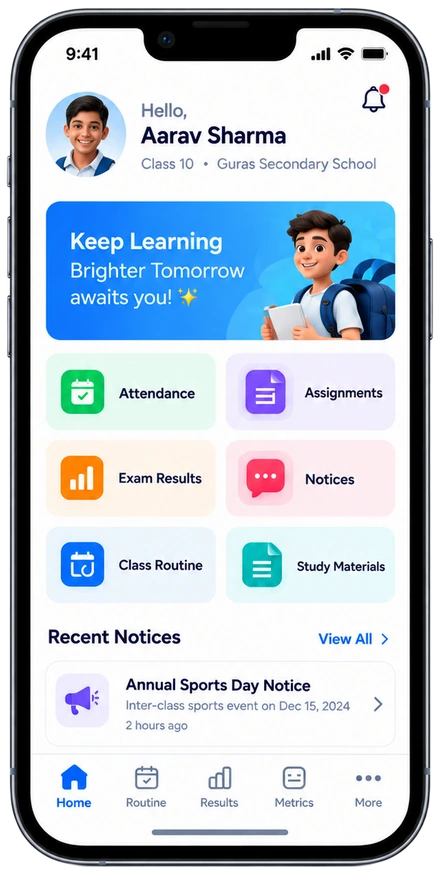
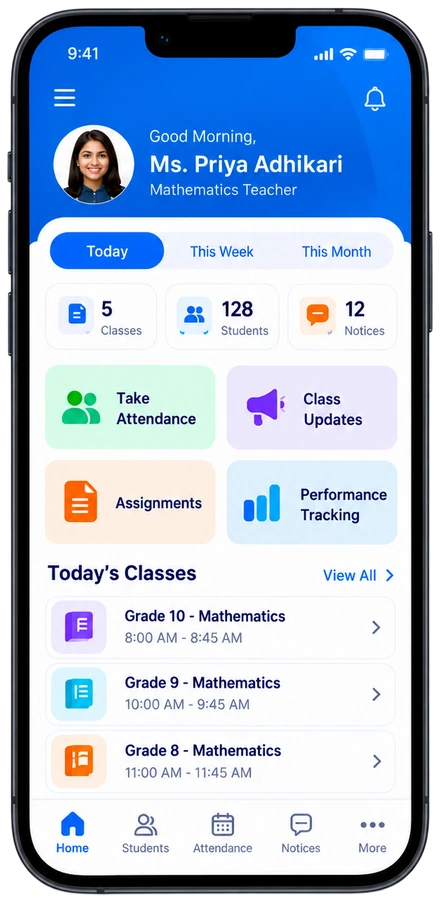
Staff work in the web app, students and parents live in the mobile apps, and the public meets your institute on its own website. All three read the same data.
Web app
Dashboards, modules and reports in one browser tab. Every person sees the menus and widgets their role allows.
Dashboard
Total
Students
Today
Attendance
Collected
Fees
Mobile apps
Attendance, homework, fees, notices and the timetable sit one tap away, so nobody waits for a printed circular.
Today
Institute website
Each institute gets its own site with notices, events, gallery and contact details, fed from the same system staff already use.
Welcome to Your School
The web app is where the daily work happens. Open it, see what needs attention, and drill into any module from the same place.
Role-based access
Admin, accountant, teacher and more each get only their own menus.
Arrangeable widgets
Build a dashboard of the numbers you check first.
Global search
Find a student, receipt or notice from anywhere.
Reports and exports
Download lists and reports from each module.
Bulk import
Bring existing students and staff in from a spreadsheet.
Activity log
See who changed what, and when.
Each module stands on its own, but none of them keep their own copy of the truth. Update a record once and it is correct everywhere.
Capture enquiries, applications and enrolment in one tracked flow — nothing falls into a spreadsheet between stages.
Courses, batches, academic years, timetables and live classes — structured once and reused every term.
Mark a class in under a minute, with registers that update parents and students instantly.
Build question papers, schedule exams, enter marks and publish results without re-keying anything.
Fee structures, instalments, receipts and outstanding balances — with a clear view of what is due and when.
Notices, circulars and messages that reach the right student, parent or teacher — and get read.
Every module rolls into reports you can export, so board meetings start with answers rather than questions.
Dashboards that show attendance, performance and fee trends early enough for your team to act.
A student's record is created once at enquiry and then carries them all the way through. No duplicate entry, no reconciling two systems at the end of term.
A phone call, walk-in or website form lands in one pipeline. The record is created once, right here.
Adds to the record Source Contact
Documents are checked and the offer is made. Nothing is re-typed; the same record moves forward.
Adds to the record Application Documents
Class, section and roll number are assigned and the guardian is linked automatically.
Adds to the record Class Admission no.
Attendance, homework and the timetable write to the same record every day.
Adds to the record Attendance Homework
Marks are entered once. Grades and the report card build themselves from the record.
Adds to the record Term 1 Report card
Bills, instalments and receipts follow the same student, and the parent app is told straight away.
Adds to the record Fees Parent app
Aarav Sharma
Grade 8 · Sample student
Role-based access
Principals, teachers, accountants and staff each see only what their role allows.
One student record
A change in attendance, marks or fees is reflected on every screen that shows that student.
Mobile for everyone
Students, parents and teachers work from the same data on iOS and Android.
Your data, exportable
Everything in GurasEMS can be exported on demand — you are never locked in.
Class 8-B attendance marked at 07:42
Parents notifiedTerm 1 marks published for Grade 8
Report cards readyFee receipt #0412 recorded at the counter
Balance updatedNotice sent to Class 8 parents
DeliveredNo separate web agency and no copy-pasting. Publish a notice or an event in the system and it shows on your public site.
Learning that shapes tomorrow
Families apply through a form on your institute's site. Each application moves through one pipeline, and the student record is created a single time.
Admission form
Student name
Class applying for
Guardian contact
Documents
Admissions pipeline
Applied
24
Verified
18
Offer
12
Enrolled
9
Fee paid
7
Sample numbers for illustration.
Fields you configure
Ask only what your institute needs.
Document upload
Applicants attach certificates with the form.
Automatic numbers
Symbol and admission numbers are generated for you.
Email and SMS notices
Keep families informed as the status changes.
Pick one brand colour and the whole palette follows. Your name, logo and colours appear across the web app, the mobile app, report cards and ID cards.
Click a colour, or drag the hue.
Brand colour
One hue generates the full palette.
Logo and favicon
Your identity in every tab and header.
Font and app name
Choose the typeface and the name people see.
Report and ID cards
Printed documents carry your branding.
Own domain
Optionally serve it from your own address.
Branded mobile app
The app can carry your name and colours.
Not a stripped-down companion app. Students, parents and teachers get the same data as the web workspace, on iOS and Android.
Attendance, assignments, results, fees and school notices — all in one place.
Take attendance, run classes and track progress without opening a laptop.
A super admin manages every branch or school from one place. Share what should be common, keep the rest per branch, and read results across all of them.
Super admin
Students across campuses
3,150
Sample numbers for illustration.
Shared across branches
Set per branch
An institute runs on this data. So the boring parts — security, access and recoverability — are built in rather than bolted on.
Data is encrypted in transit and at rest, so it stays protected on every connection.
Staff only see what their role allows — principals, teachers and accountants stay in their lane.
Automatic backups run every day, with restore points kept so a bad day is recoverable.
Export everything whenever you want. GurasEMS is a tool you use, not a place you are locked into.
Start a free trial and import your students, classes and fee structures. Most institutions are running within two weeks.
No credit card required Free 14-day trial Cancel anytime
We are still building GurasEMS. This site is a preview of how it is intended to look and behave. It is not the finished product, and there is no working system behind it to sign in to.
Every screenshot, school name, person, figure and testimonial here is sample content. Some of the numbers are placeholders and should not be read as real results.
Please do not enter real information. No form on this site stores, sends or shares anything you type into it.
or press Esc